Background Queues Module
The Background Queues module is a comprehensive asynchronous task processing system for the Comdeall platform that handles long-running operations, scheduled tasks, and background job processing. Built on BullMQ, it provides robust job management with advanced features including dead letter queues (DLQ), priority scheduling, delayed execution, and comprehensive monitoring. The system manages critical operations like email delivery, notifications, appointments, payments, and media processing to ensure optimal application performance and user experience.
The system supports advanced features such as:
- Dead Letter Queues (DLQ) for failed job tracking and post-mortem analysis
- Delayed and Priority Jobs for scheduled task execution and importance-based processing
- Dashboard UI for real-time queue monitoring and management
- Comprehensive Logging with event tracking and error handling
- Modular Architecture with dedicated processors for different job types
🔐 The queues dashboard is secured and available at:
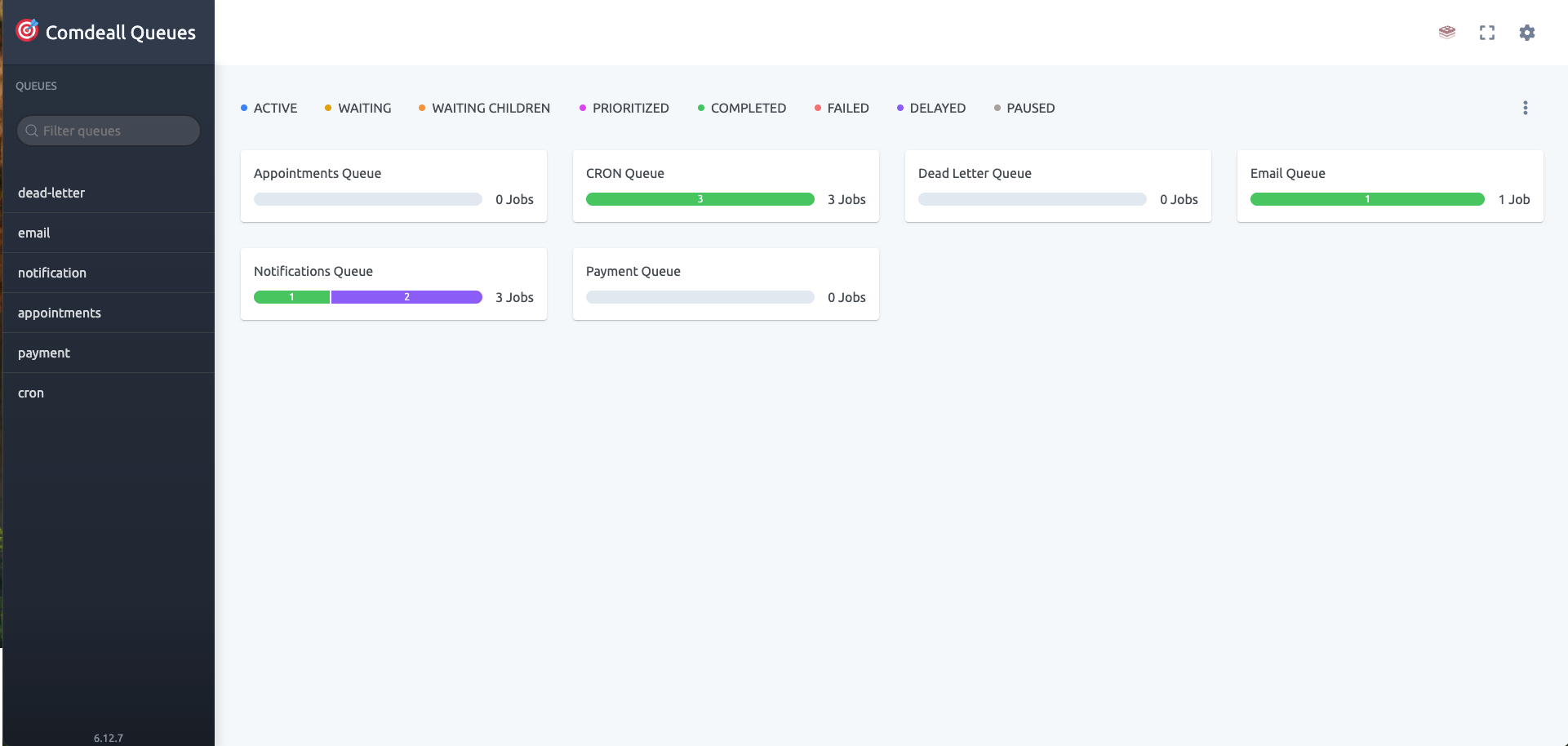
Table of Contents
- Module Structure
- Queue Architecture
- Core Features
- Queue Types
- Job Management
- Dead Letter Queue System
- Monitoring & Dashboard
- Integration Points
- Technical Implementation
- Best Practices
- Conclusion
Module Structure
The Background module follows a modular architecture with specialized queue processors:
@Module({
  imports: [
    BullModule.registerQueue(...QUEUE_LIST.map((name) => ({ name }))),
    EmailQueueModule,
    NotificationQueueModule,
    AppointmentsQueueModule,
    PaymentQueueModule,
    CronModule,
    BullBoardModule.forRoot({
      route: RouteNames.QUEUES_UI,
      adapter: ExpressAdapter,
      boardOptions: {
        uiConfig: {
          boardTitle: 'Comdeall Queues',
        },
      },
    }),
  ],
  providers: [BackgroundServiceManager],
  exports: [BackgroundServiceManager],
})
export class BackgroundModule {}
Core Components:
-
Background Service Manager: Central service for managing all queue operations and job dispatching
-
Queue Modules: Specialized modules for different job types:
EmailQueueModule: Email delivery and notification processingNotificationQueueModule: Push notification and device messagingAppointmentsQueueModule: Appointment scheduling and lifecycle managementPaymentQueueModule: Payment processing and webhook handlingCronModule: Scheduled task execution and recurring jobs
-
Processors: Dedicated job processors with concurrency control and error handling
-
Dashboard Integration: BullBoard UI for real-time queue monitoring and management
-
Dead Letter Queue: Centralized failed job handling and post-mortem analysis
Queue Architecture
Queue Types and Organization
The system implements multiple specialized queues for different operational aspects:
export enum QueueName {
  EMAIL = 'email',
  MEDIA_UPLOAD = 'media-upload',
  NOTIFICATION = 'notification',
  DEAD_LETTER = 'dead-letter',
  CRON = 'cron',
  APPOINTMENTS = 'appointments',
  PAYMENT = 'payment',
}
Queue Specialization:
- Email Queue: Registration emails, OTP delivery, support notifications
- Notification Queue: Push notifications, device messaging, topic broadcasts
- Appointments Queue: Appointment lifecycle, scheduling, status updates
- Payment Queue: Payment processing, webhook handling, subscription management
- Cron Queue: Scheduled tasks, recurring jobs, maintenance operations
- Dead Letter Queue: Failed job analysis and manual intervention
Queue Configuration and Defaults
Standardized configuration ensures consistent behavior across all queues:
export const DEFAULT_JOB_OPTIONS = {
  attempts: 3,
  backoff: {
    type: 'exponential',
    delay: 1000 * 60, // 1 min between retries
  },
  removeOnComplete: {
    age: 60 * 60 * 24, // Keep for 1 day
    count: 5000, // max entries to keep
  },
  removeOnFail: {
    age: 60 * 60 * 24 * 7, // Keep for 7 days
  },
};
Configuration Features:
- Retry Logic: Exponential backoff with configurable attempts
- Job Cleanup: Automatic removal of completed and failed jobs
- Memory Management: Controlled job retention to prevent memory issues
- Performance Optimization: Balanced configuration for optimal throughput
Core Features
Asynchronous Task Processing
Complete decoupling of time-consuming operations from request-response cycles:
Processing Benefits:
- Non-blocking Operations: HTTP requests return immediately while jobs process in background
- Scalable Performance: Parallel job processing with configurable concurrency
- Resource Optimization: Efficient resource utilization with job prioritization
- Fault Tolerance: Comprehensive error handling with automatic retry mechanisms
Advanced Job Scheduling
Sophisticated scheduling capabilities support complex business requirements:
Scheduling Features:
- Delayed Execution: Jobs scheduled for future execution with precise timing
- Priority Queuing: High-priority jobs processed before standard jobs
- Recurring Tasks: Cron-based scheduling for recurring operations
- Conditional Processing: Jobs triggered by specific events or conditions
Comprehensive Monitoring
Real-time visibility into queue operations and system health:
Monitoring Capabilities:
- Job Status Tracking: Real-time job progress and completion status
- Performance Metrics: Queue throughput, processing times, and success rates
- Error Analysis: Failed job analysis with detailed error information
- Resource Utilization: Memory usage, CPU consumption, and queue depth monitoring
Queue Types
Email Queue
Handles all email-related operations with template management and delivery tracking:
Email Job Types:
export enum JobName {
  OTP_EMAIL_VERIFICATION = 'email-otp-verification',
  REGISTRATION_EMAIL = 'registration-email',
  WITHDRAW_WALLET_REQUEST_EMAIL = 'withdraw-wallet-request-email',
  WITHDRAW_WALLET_REQUEST_FAILURE_EMAIL = 'withdraw-wallet-request-failure-email',
  SUPPORT_TICKET_RESOLVED_EMAIL = 'support-ticket-resolved-email',
  NOTE_ADDED_EMAIL = 'note-added-email',
}
Features:
- Template Processing: Dynamic email template generation with user data
- Delivery Tracking: Email delivery status monitoring and reporting
- Failover Support: Multiple email provider support with automatic failover
- Compliance Logging: Complete audit trail for email communications
Notification Queue
Manages push notifications and device messaging across platforms:
Notification Operations:
- Device Notifications: Direct push notifications to specific devices
- Topic Broadcasting: Group notifications using Firebase topics
- Custom Notifications: Admin-initiated custom notification campaigns
- Notification Logging: Comprehensive notification delivery tracking
Integration Features:
- Firebase Integration: Native Firebase Cloud Messaging support
- Multi-platform Support: iOS and Android notification delivery
- Device Management: Device token validation and cleanup
- Delivery Analytics: Notification delivery rates and engagement metrics
Appointments Queue
Handles appointment lifecycle management and scheduling operations:
Appointment Processing:
- Appointment Scheduling: Automated appointment creation and confirmation
- Status Management: Appointment status updates and notifications
- Reminder System: Automated appointment reminder delivery
- Lifecycle Tracking: Complete appointment lifecycle from creation to completion
Scheduling Features:
- Start/End Jobs: Automated appointment start and end processing
- Expiration Handling: Expired appointment cleanup and notification
- Status Synchronization: Real-time status updates across all platforms
Payment Queue
Manages payment processing, webhooks, and subscription operations:
Payment Operations:
- Webhook Processing: Razorpay webhook handling and validation
- Subscription Management: Subscription lifecycle and pricing updates
- Refund Processing: Automated refund handling and notification
- Price Updates: Subscription price change management
Financial Features:
- Transaction Tracking: Complete transaction audit trail
- Webhook Validation: Secure webhook signature verification
- Subscription Lifecycle: Automated subscription status management
- Financial Notifications: Payment confirmation and failure notifications
Cron Queue
Executes scheduled and recurring tasks for system maintenance:
Scheduled Operations:
export enum CronJobName {
  DAILY_MAIL = 'daily-mail',
  PLAN_RENEWAL_NOTIFICATION = 'plan-renewal-notification',
  CHECK_MISSING_SESSION_NOTES = 'check-missing-session-notes',
}
Cron Features:
- Daily Operations: Daily summary emails and maintenance tasks
- Renewal Notifications: Subscription renewal reminder system
- Data Validation: Automated data consistency checks
- System Maintenance: Automated cleanup and optimization tasks
Job Management
Job Lifecycle Management
Comprehensive job lifecycle tracking from creation to completion:
Lifecycle Stages:
- Job Creation: Job queued with appropriate priority and delay
- Job Processing: Worker picks up job and begins execution
- Progress Tracking: Real-time progress updates and logging
- Completion/Failure: Job completes successfully or fails with error details
- Cleanup: Automatic job cleanup based on retention policies
Job Event Monitoring
Detailed event tracking provides comprehensive visibility:
Event Types:
active: Job begins processingprogress: Job progress updatescompleted: Successful job completionfailed: Job failure with error detailsstalled: Job processing stallederror: Worker-level errors
Event Logging:
@OnWorkerEvent('failed')
async onFailed(job: Job) {
  const logString = `Job ${job.id} has failed with reason: ${job.failedReason}`;
  this.logger.error(logString);
  if (typeof job.log === 'function') job.log(logString);
}
Priority and Delay Management
Advanced job scheduling supports complex business requirements:
Priority Scheduling:
- High Priority: Critical operations like payment processing
- Normal Priority: Standard operations like email delivery
- Low Priority: Background maintenance and cleanup tasks
Delayed Execution:
- Appointment Reminders: Scheduled for specific times before appointments
- Subscription Renewals: Timed for renewal dates
- Retry Operations: Delayed retries with exponential backoff
Dead Letter Queue System
Centralized Failed Job Management
The Dead Letter Queue provides comprehensive failed job analysis:
export interface IDLQFailedJobData {
  originalQueueName: QueueName;
  originalJobId: string;
  originalJobName: string;
  originalJobData: any;
  failedReason: string;
  originalJobAttempts?: number;
  stacktrace?: string[];
  timestamp: number;
}
DLQ Features:
- Failed Job Tracking: Complete failed job metadata and context
- Post-mortem Analysis: Detailed failure analysis for debugging
- Manual Intervention: Tools for manual job retry and investigation
- Automated Notifications: Developer alerts for critical failures
DLQ Processing and Notifications
Automated DLQ processing ensures rapid failure response:
DLQ Operations:
- Failure Detection: Failed jobs automatically moved to DLQ
- Metadata Collection: Complete failure context and stack traces
- Developer Notification: Email alerts to development team
- Dashboard Integration: Failed jobs visible in monitoring dashboard
Notification Features:
- Environment Awareness: Different notification strategies for development vs production
- Rich Context: Detailed failure information for rapid debugging
- Dashboard Links: Direct links to failed job details in monitoring interface
Monitoring & Dashboard
BullBoard Dashboard Integration
Comprehensive dashboard provides real-time queue monitoring:
Dashboard Features:
- Queue Overview: Real-time status of all queues and job counts
- Job Details: Individual job inspection with logs and metadata
- Performance Metrics: Queue throughput and processing statistics
- Job Management: Manual job retry, deletion, and status modification
Access Control:
- Secured Access: Dashboard access controlled through application authentication
- Environment-Specific: Separate dashboards for staging and production environments
- Role-Based: Different access levels for developers and administrators
Real-time Monitoring
Live monitoring capabilities provide immediate system visibility:
Monitoring Features:
- Job Status: Real-time job status updates and progress tracking
- Queue Depth: Current queue sizes and processing backlogs
- Error Rates: Failed job percentages and error trend analysis
- Performance Metrics: Job processing times and throughput statistics
Integration Points
Application Module Integration
Seamless integration with the main application architecture:
Integration Features:
- Service Injection: Background services available throughout application
- Event-Driven: Queue jobs triggered by application events
- Database Integration: Queue operations coordinated with database transactions
- API Integration: Background jobs triggered by API operations
External Service Integration
Queue operations integrate with external services and APIs:
External Integrations:
- Email Providers: Integration with Brevo, Resend, and Mailjet
- Firebase: Push notification delivery through Firebase Cloud Messaging
- Payment Gateways: Razorpay webhook processing and payment operations
- Storage Services: Media upload processing with cloud storage providers
Technical Implementation
Queue Processor Architecture
Each queue implements a dedicated processor with specialized logic:
@Processor(QueueName.EMAIL)
export class EmailProcessor extends WorkerHost {
  async process(job: Job<EmailJobTypes>): Promise<any> {
    // Specialized email processing logic
    return this.emailQueueService.processEmailJob(job.data);
  }
}
Processor Features:
- Dedicated Logic: Specialized processing for each job type
- Error Handling: Comprehensive error catching and logging
- Event Monitoring: Complete job lifecycle event tracking
- Performance Optimization: Efficient processing with minimal resource usage
Job Interface Design
Strongly-typed job interfaces ensure data consistency:
Interface Benefits:
- Type Safety: Compile-time validation of job data structures
- Documentation: Self-documenting job requirements and formats
- Validation: Runtime validation using class-validator decorators
- IDE Support: Enhanced development experience with autocomplete and error detection
Configuration Management
Centralized configuration ensures consistent behavior:
Configuration Features:
- Environment-Specific: Different settings for development, staging, and production
- Retry Policies: Configurable retry attempts and backoff strategies
- Cleanup Policies: Automatic job cleanup with configurable retention periods
- Concurrency Control: Configurable worker concurrency for optimal performance
Best Practices
Job Design Principles
Effective job design ensures reliable and maintainable background processing:
Design Guidelines:
- Idempotent Operations: Jobs should be safely retryable without side effects
- Small Job Scope: Individual jobs should handle single, focused operations
- Error Resilience: Comprehensive error handling with appropriate retry strategies
- Timeout Management: Reasonable timeouts to prevent resource exhaustion
Performance Optimization
Queue performance optimization ensures scalable background processing:
Optimization Strategies:
- Batch Processing: Group related operations for efficient processing
- Priority Management: Use priority queues for time-sensitive operations
- Resource Monitoring: Monitor memory and CPU usage for optimal performance
- Queue Balancing: Distribute load across multiple workers and queues
Monitoring and Alerting
Comprehensive monitoring ensures reliable queue operations:
Monitoring Practices:
- Queue Depth Monitoring: Alert on excessive queue backlogs
- Error Rate Tracking: Monitor failed job percentages and trends
- Performance Metrics: Track job processing times and throughput
- Dead Letter Queue: Regular review of failed jobs for system improvement
Conclusion
The Background Queues module provides a robust, scalable, and comprehensive asynchronous processing foundation for the Comdeall platform. Key strengths include:
Comprehensive Queue Management:
- Specialized Queues: Dedicated processing for emails, notifications, appointments, and payments
- Advanced Scheduling: Priority queues, delayed execution, and recurring tasks
- Dead Letter Queue: Centralized failed job management with detailed analysis
- Real-time Monitoring: Live dashboard with comprehensive job tracking and management
Production-Ready Features:
- BullMQ Integration: Industry-standard queue processing with Redis backing
- Error Handling: Comprehensive error management with automatic retry mechanisms
- Performance Optimization: Efficient job processing with configurable concurrency
- Security Implementation: Secured dashboard access with environment-specific configurations
Operational Excellence:
- Monitoring Dashboard: Real-time queue monitoring with job management capabilities
- Automated Notifications: Developer alerts for critical failures and system issues
- Comprehensive Logging: Detailed job tracking and audit trails for compliance
- Scalable Architecture: Supports high-volume job processing with horizontal scaling
The module's architecture enables reliable, efficient, and maintainable background processing essential for the therapy management platform, ensuring optimal user experience through non-blocking operations and comprehensive system monitoring.
Usage Examples
Adding Jobs to Queues
import { Injectable } from '@nestjs/common';
import { BackgroundServiceManager } from '@bg/background-service-manager';
import { IOtpEmailJob } from '@bg/interfaces/job.interface';

@Injectable()
export class AuthService {
  constructor(private readonly backgroundServiceManager: BackgroundServiceManager) {}

  async sendOtpEmail(email: string, otp: number) {
    const jobData: IOtpEmailJob = { email, otp };
    await this.backgroundServiceManager.addOtpEmailJob(jobData);
  }
}
Scheduled and Priority Jobs
// High priority appointment notification
await this.backgroundServiceManager.addNotificationJob(notificationData, {
  priority: 10,
  delay: 0
});

// Delayed appointment reminder
await this.backgroundServiceManager.addNotificationJob(reminderData, {
  delay: 24 * 60 * 60 * 1000 // 24 hours delay
});
Benefits
✅ Fully Asynchronous: Non-blocking operations improve application responsiveness
✅ Robust Error Handling: Comprehensive error tracking with automatic retry and DLQ
✅ Central Monitoring: Authenticated dashboard with real-time queue visibility
✅ Advanced Scheduling: Priority and delayed job execution for complex workflows
✅ Modular Architecture: Extensible queue design for easy feature additions
✅ Production Ready: Comprehensive logging, monitoring, and error handling
📘 Note: Always ensure jobs are idempotent, define appropriate retry limits, and monitor queue performance regularly for optimal system operation.